I have been using the Steemleo Dashboard, the newest version of its homepage or frontend, and this is a summary of its components and my impressions.
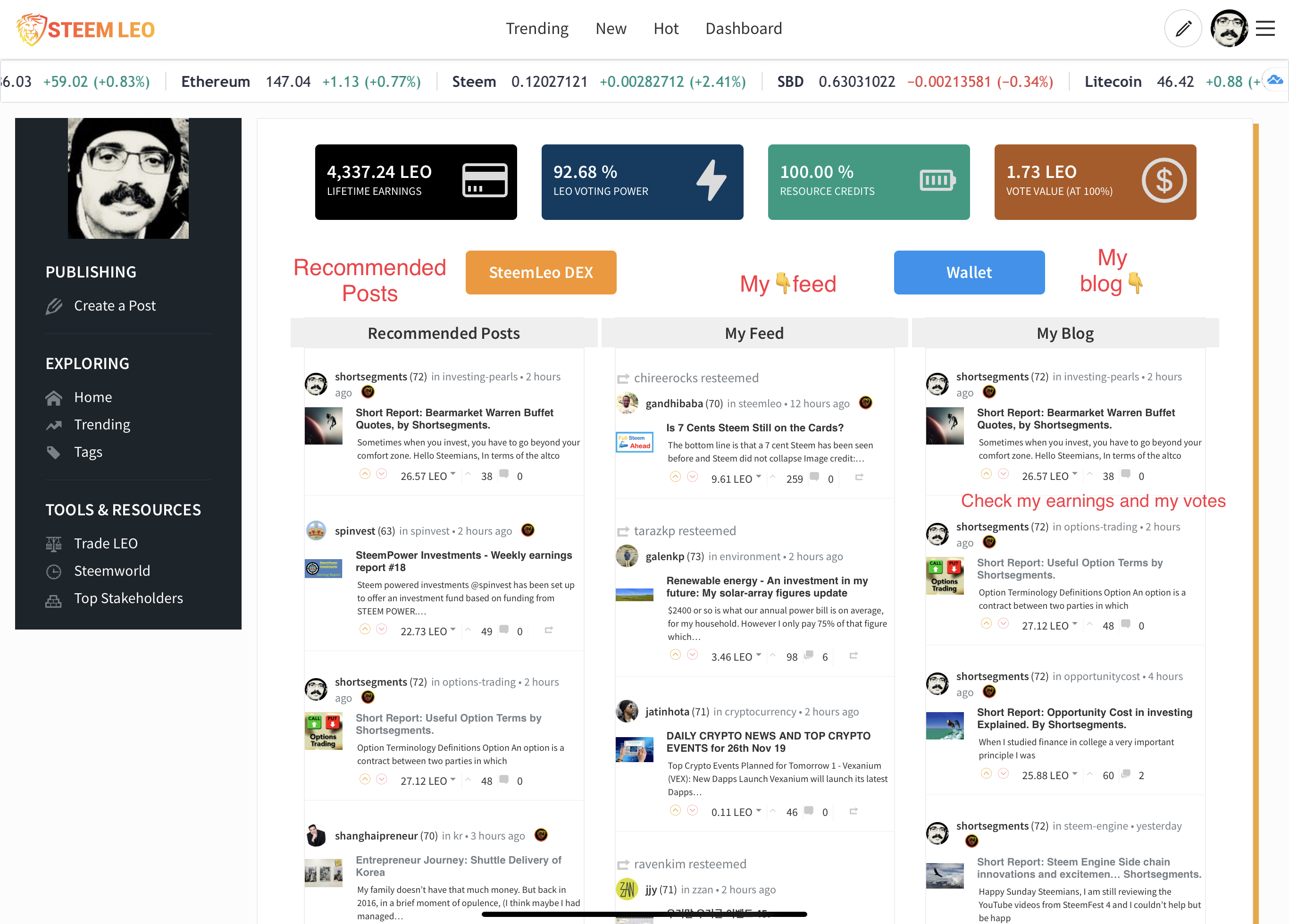
Features of the Dashboard:
- Lifetime Earnings
- LEO Voting Power
- Resource Credits
- Vote Value at 100%
- Sidebar Panel
- DEX & Wallet Buttons For Quick Navigation
- Recommended Posts
- Recommended, Feed & Blog in One Location
- Mobile-Optimized
Lifetime Earnings:
The first box shows the total amount of LEO that your account has made since the beginning of the SteemLeo network. This includes both curation and author rewards.
LEO Voting Power:
The second box, highlighted in blue, shows your current LEO voting power. Note: this can vary from your Steem voting power.
Resource Credits:
Resource credits are displayed in the third box. This is your current amount of resources credits, which are the fees you pay to transact on the blockchain.
Vote Value at 100%:
The fourth box displays the current value of one of your LEO upvotes at 100% voting power.
Sidebar Panel:
The sidebar panel (on desktop) features links for navigation to important places on Steem and SteemLeo.
DEX & Wallet Buttons For Quick Navigation:
Just below the 4-box panel are two buttons that enable quick navigation to the SteemLeo DEX and the SteemLeo wallet pages.
Recommended Posts:
The Recommended tab is the Steemleo solution to the problem of how to find high quality posts. This tab will also display curated content from the SteemLeo team.
Recommended, Feed & Blog in One Location:
You can now easily check-in on multiple feeds. You can check-in on your recent blog posts earnings, votes, comments and look for something interesting to read from your Feed or the Recommended post tabs.
Mobile-Optimized:
All the display functions on the Dashboard are optimized on mobile. They appear a little different as the data boxes and buttons at the top turn into sliders for swipe/tap navigation. The three post feeds — Recommended, My Feed and My Blog turn into a tap-to-display dropdown menu.
My Impressions.
I think this new look is very intuitive if you read all the labeling and take a moment to think how you would access these functions on the previous frontend and the Steem frontend. I find the amount of information available is valuable, easy to find and the organization saves me time and assists to me to find things I didn’t know I wanted to know and would find useful. 👍
✍🏼 by Shortsegments
Read other articlesby me on the Steemit Social Media Platform, where writers get paid for their content by the community by upvotes worth the cryptocurrency, called Steem.